







Features
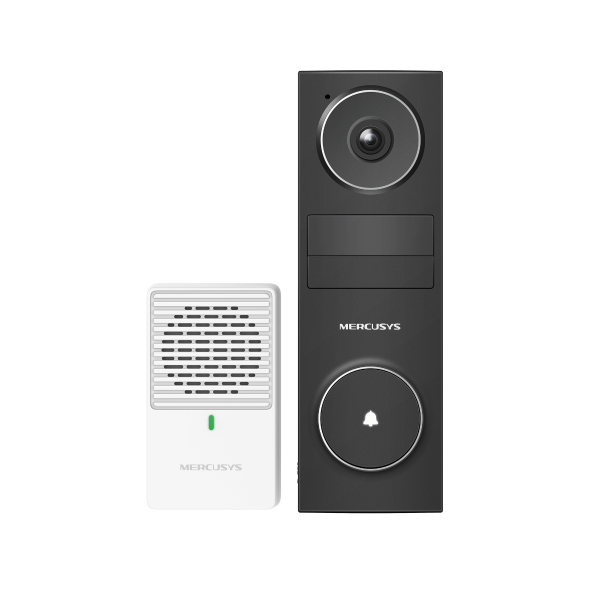
- How to Set up and Install MERCUSYS Battery Video Doorbell (Take MD210 as an example)
- Create a profile for each family member you would like to manage. Assign devices to the profile to set access controls and time limits for them.
- Set daily limits on how long your kids spend online and prevent them from accessing the internet on their devices for a long time to build a healthy network habit.
- Suspend family members’ internet connections to take a break from the virtual world to enjoy some family time.
- Intuitively view the working status of your Halo network and see what is connected. Prioritize or block devices as needed.
- The MERCUSYS app proactively sends out an alert to inform you when an unfamiliar device is connected. Tap to block the device if it is a security risk.
- Provides a separate network for guests to ensure your security and privacy.
Technical specifications
| Image Sensor | 1/2.8” Progressive Scan CMOS Sensor |
|---|---|
| Lens | Focal Length: 2.4 mm Aperture: F2.2 Field of View: 160 (Diagonal), 143.1°(Horizontal), 76.3°(Vertical) |
| Night Vision | 2× 850 nm IR LEDs (25 ft, 7.6 m) Black and White Image |
| Interface & Button | Video Doorbell-MD210D: 1× RESET Button 1× Doorbell Button 1× microSD Card Slot 1× USB Type-C Port Chime-MD210C: 1× RESET Button |
| Maximum Resolution | 2304 × 1296 px |
| Digital Zoom | 10.8× |
| Frame Rate | 15 fps |
| Video Compression | H.264 |
| Live View | Yes |
| Image Enhancement | 3DNR WDR |
| Audio Input & Output | Video Doorbell-MD210D: Built-in microphone and speaker Chime-MD210C: Speaker |
| Audio Communication | Two-Way Audio with Noise Cancellation |
| Power | Video Doorbell-MD210D: 1. Power consumption in networked standby: 0.95 W 2. Power consumption in networked standby when all wireless network ports are activated: 0.95 W 3. Power consumption in low power mode: 0.06 W 4. The default period of time after which the power management function switches the equipment automatically into a condition providing networked standby or low power mode: _20__minutes 5. Use only power supplies listed in the user instruction: Manufacturer: AOHAI Model: A806A-050100U-EU1 Chime-MD210C: 1. Power consumption in networked standby: 0.50 W 2. Power consumption in networked standby when all wireless network ports are activated: 0.50 W 3. Power consumption in low power mode: 0.48 W 4. The default period of time after which the power management function switches the equipment automatically into a condition providing networked standby or low power mode: _20__minutes |
| Local Storage | Micro SD card slot (Supports up to 512GB) |
| Cloud Storage | MERCUSYS Camera Care Cloud Storage Services (Subscription required) |
| Security | Video Doorbell-MD210D: Local AI Detection 128-bit AES Encryption with SSL/TLS WPA/WPA2-PSK/WPA3-PSK Chime-MD210C: 128-bit AES Encryption with SSL/TLS WPA/WPA2-PSK/WPA3-PSK |
| Network Connectivity | Connect via Wi-Fi |
| Wireless Connectivity | IEEE 802.11b/g/n, 2.4 GHz Wi-Fi |
| Power Source | Video Doorbell-MD210D 5200 mAh Built-in Rechargeable Lithium-ion Battery Chime-MD210C Mains Electricity |
| Sensor | Single PIR Motion Sensor Motion Detection Range: 31 ft |
| AI Detection | Person and Motion Detection |
| Activity Zones | Yes |
| Output Notification | System Notification System Notification with Snapshot (Subscription Required) |
| Smart Integration | Google Assistant, Amazon Alexa, Samsung SmartThings |
| Weather Resistance | IP54 |
| Mounting Options | Stick to a Wall Mount to a Wall |
| Operating Temperature | -20℃~45℃ |
| Storage Temperature | -40℃~60℃ |
| Operating Humidity | 10%~90% RH, Non-condensing |
| Storage Humidity | 0~90% RH, Non-condensing |
| Dimensions ( W x D x H ) | Video Doorbell-MD210D: 140.0 × 46.0 × 32.6 mm (5.51 × 1.81 × 1.28 inches) Chime-MD210C: 43.5 × 43.2 × 72.9 mm (1.7 × 1.7 × 2.9 inches) |
| Certifications | CE, NTRA |
| Package Contents | MERCUSYS Video Doorbell × 1 Chime× 1 Mounting Brackets × 1 Horizontal Mounting Wedge× 1 3M Adhesive× 1 Foam Pad× 1 Screws and Anchors USB Cable× 1 Mounting Template Sticker × 1 Quick Start Guide |
Need help choosing a product?
Contact ADT for availability, compatibility and advice for your project.